

In today’s competitive e-commerce landscape, leveraging every available avenue to reach potential customers is crucial. Google Shopping stands as a powerful platform that connects businesses directly with consumers actively searching for products online. This comprehensive guide provides e-commerce businesses with actionable strategies to maximize their sales potential using Google Shopping, covering everything from initial setup and optimization to advanced campaign management and analytics. Whether you’re new to Google Shopping or seeking to refine your existing strategies, this guide will equip you with the knowledge and tools to succeed.
This guide delves into the essential components of a successful Google Shopping strategy. Learn how to effectively structure your product feed, optimize product titles and descriptions for maximum visibility, and implement bidding strategies that align with your business goals. We’ll explore how to leverage keywords, target the right audience, and analyze performance data to continuously improve your campaigns. By mastering these techniques, you can drive more traffic, increase conversions, and ultimately maximize your sales using the immense power of Google Shopping.
Introduction to Google Shopping and Its Benefits
Google Shopping is a powerful platform that allows e-commerce businesses to showcase their products directly to potential customers searching on Google. Unlike traditional text-based ads, Google Shopping displays product images, prices, and store information, providing a visually rich shopping experience.
This highly targeted approach connects businesses with shoppers actively looking for specific items. By displaying product details upfront, Google Shopping helps pre-qualify leads, resulting in a higher likelihood of conversion.
Several key benefits distinguish Google Shopping as a valuable asset for online retailers:
- Increased Visibility: Your products appear prominently at the top of search results, capturing immediate attention.
- Improved Click-Through Rates: Visual product listings are more engaging and enticing than standard text ads.
- Better Qualified Leads: Shoppers see crucial product information upfront, leading to more relevant clicks and higher conversion rates.
- Enhanced Brand Awareness: Even if a purchase isn’t made immediately, displaying your products on Google Shopping reinforces brand recognition.
Setting Up Your Google Merchant Center Account
Your Google Merchant Center account is the foundation of your Google Shopping efforts. It’s where you’ll submit your product data and manage how your products appear on Google Shopping.
To begin, navigate to the Google Merchant Center website and click “Sign up.” You’ll need a Google account. If you manage multiple businesses, create a separate Merchant Center account for each.
During the setup process, you’ll be asked to provide key information about your business, including your business name, website address, and primary contact. Accurately filling out this information is crucial for account verification.
Claim and verify your website URL. This confirms your ownership and allows Google to access your product data. Verification methods typically include adding a meta tag to your website’s homepage or uploading an HTML file.
Once verified, familiarize yourself with the Merchant Center interface. Explore the different sections, including “Products,” “Shipping,” and “Settings.” Understanding the platform’s functionalities will be essential for managing your product listings and campaigns effectively.
Creating and Optimizing Your Product Feed
Your product feed is the heart of your Google Shopping campaign. It’s a detailed inventory file providing Google with all the necessary information about your products. A well-structured and optimized feed is crucial for ensuring your products appear in relevant searches and attract potential customers.
Creating your feed involves organizing key product attributes in a format Google understands. Essential attributes include a unique ID, title, description, price, availability, condition, and link to your product page. Additional attributes, such as brand, size, color, and GTIN, further refine product categorization and improve visibility.
Optimizing your product feed involves continuously refining these attributes. Regularly updating your feed with accurate information like pricing and availability is critical. Focus on writing compelling and accurate product titles and descriptions incorporating relevant keywords shoppers use.
Regularly review your product feed for errors and inconsistencies. Google Merchant Center provides diagnostic tools to identify and resolve issues. A clean and optimized feed ensures your products are shown to the right audience, maximizing your potential for conversions.
Managing Your Google Shopping Campaigns
Effectively managing your Google Shopping campaigns is crucial for maximizing your return on investment. Campaign structure plays a vital role. Organize your campaigns by product categories or brands for granular control over bidding and targeting. This allows you to allocate budget strategically based on product performance.
Bidding strategies significantly impact your campaign’s success. Experiment with different automated bidding strategies like Maximize Clicks, Target ROAS, or Enhanced CPC to find what works best for your business goals. Manual bidding allows for more precise control but requires consistent monitoring and adjustments.
Regularly monitor your campaign performance using key metrics like click-through rate (CTR), conversion rate, and cost-per-conversion. Identify top-performing products and allocate more budget to them. Analyze underperforming products and adjust bids, product descriptions, or even remove them from the campaign if necessary.
Negative keywords are essential for preventing your ads from showing for irrelevant searches, thereby saving you money. Regularly review search term reports and add negative keywords to refine your targeting.
Utilizing Google Shopping Ads for Maximum Reach
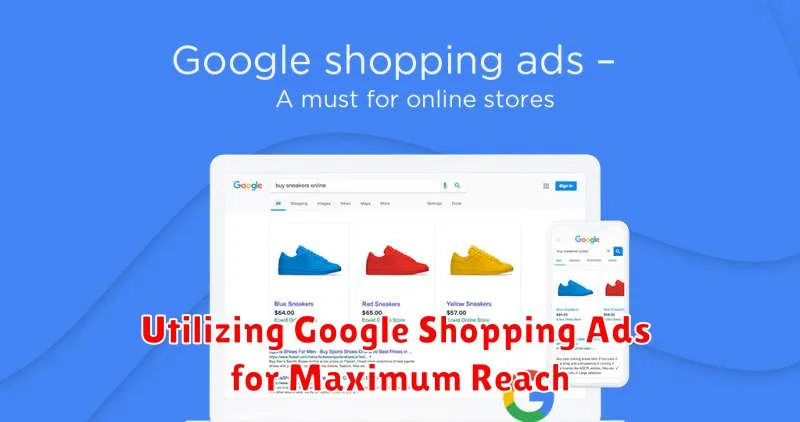
Google Shopping Ads provide a powerful platform to broaden your product visibility and connect with a wider audience of potential customers actively searching for items like yours.
Campaign Segmentation is key. Divide your campaigns into relevant product groups. This allows for more targeted bidding and budget allocation based on product performance and profitability. Consider segmenting by brand, product type, or even margin.
Remarketing with Shopping Ads allows you to re-engage users who previously interacted with your products. Target these users with tailored ads showcasing relevant items they viewed or added to their cart, increasing conversion chances.
Experiment with different bid strategies. Automated bidding like “Maximize Clicks” or “Target ROAS” can help optimize your campaigns based on your specific goals. Monitor performance closely and adjust strategies as needed.
Leverage Customer Match to reach existing customers with Shopping Ads. Upload your customer email lists to target these valuable shoppers directly with personalized product promotions.
Leveraging Product Reviews and Ratings
Product reviews and ratings play a crucial role in influencing customer purchase decisions on Google Shopping. High ratings and positive reviews can significantly boost your product’s visibility and click-through rate, leading to increased sales.
Encourage satisfied customers to leave reviews on your products. Make the process easy and accessible. Consider sending follow-up emails post-purchase with a direct link to your product review page.
Actively manage your reviews. Respond to both positive and negative feedback. Addressing concerns and demonstrating excellent customer service can turn a negative experience into a positive one, building trust with potential buyers.
Monitor your product ratings and identify any patterns or trends. Low ratings might indicate issues with product quality or customer service that need to be addressed promptly.
Tracking and Analyzing Your Google Shopping Performance
Monitoring your Google Shopping campaigns is crucial for maximizing your return on investment. Regular analysis helps you understand what’s working and what needs adjustment. Key Performance Indicators (KPIs) provide valuable insights into your campaign’s effectiveness.
Track metrics like clicks, impressions, click-through rate (CTR), conversion rate, and cost per conversion. Use Google Ads reporting tools to access this data. Segment your data by product, campaign, or time period for a more granular analysis.
Regularly reviewing these metrics helps identify top-performing products and areas for improvement. For example, a low CTR might indicate the need for better product titles or images. A high cost per conversion could suggest adjustments to bidding strategies.
By consistently tracking and analyzing these KPIs, you can refine your campaigns and optimize your spending for maximum impact.
Advanced Strategies for Google Shopping Success
Once you’ve mastered the basics of Google Shopping, implementing advanced strategies can significantly enhance your campaign performance and drive more sales. These strategies require a deeper understanding of your data and a willingness to experiment.
Bidding Strategies and Automation
Explore automated bidding strategies like Target ROAS or Maximize Conversion Value. These strategies use machine learning to optimize your bids in real time, potentially improving your return on ad spend. However, ensure you have sufficient conversion data for these strategies to work effectively.
Audience Targeting and Segmentation
Customer Match allows you to target existing customers with tailored Shopping ads. You can segment your audiences based on purchase history, demographics, or website behavior to personalize your messaging and offers. Consider using Remarketing Lists for Search Ads (RLSA) to reach users who previously interacted with your website or products.
Optimizing Product Titles and Descriptions
Beyond basic keyword inclusion, focus on creating compelling product titles and descriptions that highlight unique selling propositions and benefits. Use strong, descriptive language that resonates with your target audience and addresses their pain points. Regularly A/B test different versions to determine what performs best.
Integrating Google Shopping with Other Marketing Channels
Integrating your Google Shopping campaigns with other marketing channels creates a synergistic approach that amplifies your reach and maximizes your return on investment. This holistic strategy ensures consistent messaging and a cohesive brand experience across multiple touchpoints.
Connection with Social Media
Promote your Google Shopping products on social media platforms. Use high-quality images and engaging captions to drive traffic directly to your product listings. Consider utilizing shoppable posts where available for a seamless purchase experience.
Email Marketing Integration
Leverage email marketing to showcase your Google Shopping inventory to your subscriber base. Feature top-selling products, new arrivals, or special promotions directly in your email campaigns. Segmented email lists can be particularly effective for targeting specific customer demographics with relevant product offerings.
Paid Search Campaigns
Coordinate your Google Shopping campaigns with your paid search (text ads) strategy. This dual approach captures users at different stages of the buying process. Use paid search to target broader keywords and Google Shopping for more product-specific searches.
Staying Up-to-Date with Google Shopping Trends
In the dynamic world of e-commerce, staying ahead of the curve is crucial. Google Shopping is constantly evolving, with new features, policies, and best practices emerging regularly. Keeping abreast of these changes is essential for maintaining a competitive edge and maximizing your return on investment.
Active monitoring of Google’s official announcements and resources is the most reliable way to stay informed. Subscribe to the Google Merchant Center blog and follow relevant industry publications. Attending webinars and online conferences focused on Google Shopping can provide valuable insights and expert advice.
Pay close attention to competitor activity. Analyzing their product listings, pricing strategies, and promotional campaigns can reveal emerging trends and opportunities for optimization within your own campaigns.
Embrace experimentation. Don’t be afraid to test new features and strategies. A data-driven approach, using analytics to track the impact of your experiments, will help you identify what works best for your specific products and target audience.
