
Want to boost your online sales and reach a wider audience? Connecting your online store to Google Merchant Center is a crucial step. This comprehensive guide provides beginners with a step-by-step approach to linking your store, allowing you to harness the power of Google Shopping and showcase your products directly to potential customers searching on Google. Learn how to effectively utilize Google Merchant Center, optimize your product feeds, and unlock the potential of free listings and paid shopping campaigns to drive significant growth for your business. Whether you’re selling apparel, electronics, or home goods, understanding the Google Merchant Center is essential for e-commerce success.
Navigating the complexities of Google Merchant Center can be daunting for newcomers. This guide simplifies the process, breaking down each step into manageable segments. From creating a Google Merchant Center account and understanding the requirements for product feeds to troubleshooting common issues and optimizing for conversions, we’ll equip you with the knowledge and tools you need to successfully integrate your store and leverage the full potential of Google Shopping. Get ready to increase your online visibility, attract more qualified leads, and maximize your return on investment (ROI) with this practical guide to Google Merchant Center.
Understanding the Benefits of Google Merchant Center
Google Merchant Center acts as a vital bridge between your online store and Google Shopping, unlocking a wealth of opportunities to reach potential customers. By connecting your store, you gain access to a broader audience actively searching for products like yours.
Increased Visibility is a key advantage. Your products can appear directly in Google Shopping search results, showcasing them to users who are already expressing buying intent. This targeted approach leads to more qualified leads and potentially higher conversion rates.
Detailed Product Information helps customers make informed decisions. You can provide comprehensive details about your products, including images, prices, and availability, directly within the search results. This transparency builds trust and encourages purchases.
Enhanced Shopping Campaigns become possible with Google Merchant Center. Leverage your product data to create and manage effective Shopping campaigns, targeting specific demographics and interests to maximize your return on investment.
Valuable Insights and Reporting are available through the platform. Monitor the performance of your products and campaigns, gaining data-driven insights to optimize your strategies and improve your overall sales performance.
Creating a Google Merchant Center Account
Setting up your Google Merchant Center account is the first step towards showcasing your products on Google Shopping. This process is straightforward and involves a few key steps.
Begin by navigating to the Google Merchant Center website. Click the “Sign up” button to initiate the process. You will need a Google account to proceed. If you don’t already have one, you’ll be prompted to create one. This Google account will be the administrator of your Merchant Center account.
Next, provide the required information about your business. This includes your business name, country, and physical address. You also need to accept the terms and conditions of Google Merchant Center.
After submitting this information, Google will need to verify your website. This verification process confirms you own the website associated with your product listings. There are several verification methods available, and you can choose the one that best suits your website configuration. Common methods include adding a meta tag to your website’s homepage, uploading an HTML file, or linking your Google Analytics account.
Connecting Your E-Commerce Platform to Google Merchant Center
Connecting your e-commerce platform simplifies product data submission to Google Merchant Center. Most platforms offer direct integrations, streamlining the process.
Choose the right integration method: Depending on your platform, you’ll typically find options like a dedicated app, plugin, or direct API connection within the platform’s settings or app store.
Follow platform-specific instructions: Each platform has its own connection process. Consult your platform’s help documentation for step-by-step guidance. Generally, you’ll need to authorize the connection between your platform and Google Merchant Center, granting necessary permissions.
Supported platforms: Many popular e-commerce platforms are supported, including Shopify, WooCommerce, BigCommerce, and Magento. If you’re unsure about your platform’s compatibility, check with your platform provider or Google Merchant Center’s documentation.
Once connected, your product data will be automatically synced to Google Merchant Center, saving you time and effort.
Setting Up Your Product Feed
Your product feed is the heart of your Google Merchant Center. It provides Google with all the necessary information about your products, allowing them to be displayed accurately on Google Shopping. A well-structured and complete feed is crucial for visibility and performance.
You have several options for setting up your product feed. You can choose to upload a file directly, such as a text file (TXT) or an XML file, or you can schedule automatic fetches from a file hosted on your server. If your platform supports it, you can also use a content API.
Key information required in your product feed includes:
- id: A unique identifier for each product.
- title: The product’s title, as it would appear on your website.
- description: A detailed description of the product.
- link: The URL to the product page on your website.
- image_link: The URL of the main product image.
- price: The current price of the product.
- availability: Whether the product is in stock, out of stock, or preorder.
Remember to consult Google Merchant Center’s guidelines for the complete list of required and recommended attributes.
Optimizing Your Product Data for Google Shopping
Optimizing your product data is crucial for maximizing visibility and click-through rates on Google Shopping. Accurate and comprehensive product information ensures your products are shown to the right customers searching for exactly what you offer.
Key areas for optimization include:
- Product Titles: Use concise, descriptive titles that accurately reflect the product. Include relevant keywords that customers might use when searching.
- Descriptions: Provide detailed, compelling descriptions highlighting key features and benefits. Be specific and avoid generic language.
- High-Quality Images: Use clear, professional images that showcase your products effectively. Multiple images from different angles are recommended.
- Pricing and Availability: Ensure your pricing is competitive and that your availability information is accurate and up-to-date.
- Unique Product Identifiers (UPIs): These identifiers (like GTINs, MPNs, and brand names) help Google accurately match your products with relevant searches.
By carefully optimizing these elements, you’ll improve your product’s visibility, attract more qualified clicks, and ultimately drive more sales through Google Shopping.
Troubleshooting Common Google Merchant Center Errors
Encountering errors in Google Merchant Center is normal. This section outlines common issues and how to resolve them.
Product Data Issues
Missing required attributes: Ensure all required attributes for your product category are provided. This often includes ‘id’, ‘title’, ‘description’, ‘link’, ‘image_link’, ‘price’, ‘availability’, and ‘condition’.
Incorrect attribute values: Double-check values for accuracy. For example, ensure prices are formatted correctly and availability reflects your actual stock levels.
Feed Issues
Invalid file format: Use a supported format (e.g., text (TSV or TXT), XML (.xml, .gz, or .bz2)). Verify your file adheres to the specified formatting guidelines.
Fetch errors: Google needs to access your product feed. Confirm the URL is correct and accessible. Consider using a publicly accessible URL if you’re experiencing issues.
Policy Violations
Misrepresentation: Accurately represent your products and services. Ensure your landing pages match the product information provided in your feed.
Editorial requirements: Adhere to Google’s editorial guidelines. Avoid using all caps or excessive promotional language in titles and descriptions.
Monitoring Your Google Merchant Center Performance
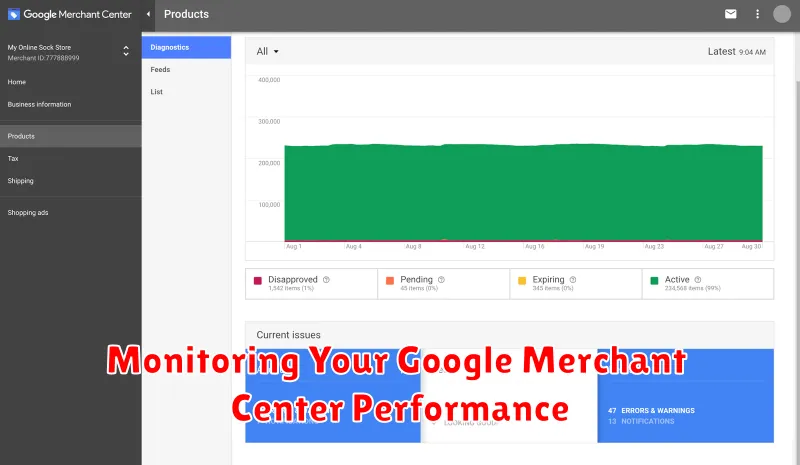
Regularly monitoring your Google Merchant Center account is crucial for maintaining optimal performance and identifying potential issues early on. This allows you to address problems promptly and ensure your product data is accurate and up-to-date.
Within the Merchant Center dashboard, utilize the Performance tab to gain valuable insights into your account’s health. Pay close attention to key metrics such as click-through rate (CTR) and impression share to gauge the effectiveness of your product listings. A low CTR might indicate issues with your product titles or images, while a declining impression share could suggest problems with your product data or bidding strategy.
The Diagnostics section provides detailed information on any data feed errors or warnings. Regularly review this section to address any issues promptly and prevent them from impacting your product visibility.
Tips for Success with Google Merchant Center
Optimize your product data. Ensure your product titles, descriptions, and attributes are accurate, complete, and follow Google’s guidelines. High-quality data improves product visibility and click-through rates.
Regularly monitor your product data feed. Check for errors and warnings in Google Merchant Center and address them promptly. A clean data feed ensures your products remain eligible for Shopping ads.
Use high-quality product images. Clear, professional images showcase your products effectively and attract potential customers. Follow Google’s image requirements for optimal performance.
Implement Google Analytics tracking. Connecting Google Analytics to your Merchant Center allows you to track the performance of your Shopping campaigns and identify areas for improvement.
Stay updated with Google Merchant Center policies. Google frequently updates its policies, so stay informed to avoid account suspensions or disapprovals.
